

Forum Replies Created
-
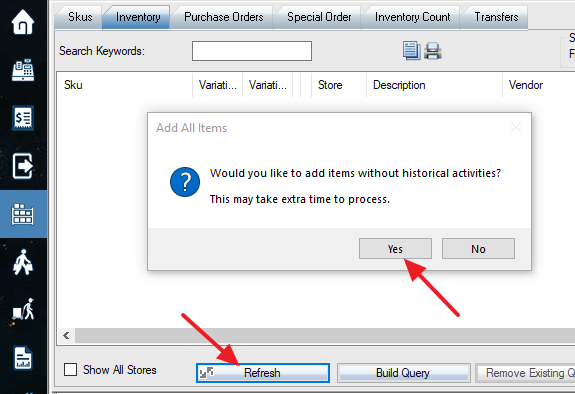
The products are not “manage stock” or no sale or PO history won’t show up. Please try this before print the inventory reports:
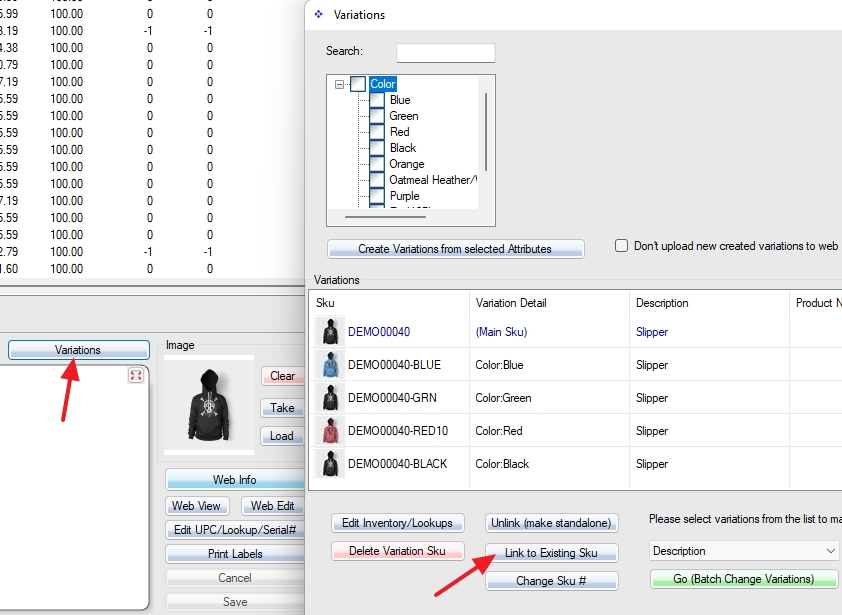
If you have three simple products already in the POS, and you want to add these three Skus as variations of a new variable main Sku, you can use this function to add the existing Skus to the variation Skus. The three simple Skus should have the same attribute set as the main Sku, and have variation attribute value (eg Color: red or blue) set up already.
The cost is average of landed (final) receiving cost. If you sold items before PO receive posting, the cost may not be correct. You can go avg cost field in Sku Info tab to manually fix it. Please give me a Sku example which has the wrong cost.
The currency symbol in reports can be changed in region and language settings in Windows control panel. The store attributes currency won’t work with reports.
We cannot change the extra line on the report as this may affect other reports or other clients. You can print “Raw Data” report and format yourself.
It’s done. Please get the upgrade. The POS web will allow you to invoice without payment. A web payment type will be automatically added in, tagged as paid.
Please check this:
You should use “Quick Add” function to add items for another store. Please use “Add Items” or “Edit Qty” on the bottom left of the PO Order&Receive screen, select “Show All Stores” on the next screen. Pay attention to the store name of each line.
1. If you create PO in store 1, and add order items for both store 1 and 2. When you login store 2, you should only see items for store 2.
2. Looks like you did not check on “Show All Stores” when you added order items. You can order items for both store 1 and 2 while you log in to store 1. And you can choose ship to stores directly or ship to one store and then distribute/transfer to another store. The main difference is PO report to instruct vendor’s shipment. Please send a screenshot or a video (http://www.recordit.co/) by email how do you add items.
I think you can do inventory manual adjustment. You can put adjustment reason and detail as a note, and print the inventory adjustment report. Or create a new store, transfer items to the new store. You can also do PO or sales, it depends on how you do accounting.
Assembled products are physical products you manage stock quantities. Like you sell computers assembled from the motherboard, RAM, CPU, and SSD, the computer is an Assembled product. When assembling, you increase (adjust inventory) the quantity on the computer and decrease the quantity of the parts. So the quantities of the sub-items will not change when you sell the Assembled product (the computer, main SKU) unless you turn on the switch 101 (auto-assemble) in the store settings. Prices, quantities and taxes are calculated based on the Assembled product (the main SKU, not sub-items).
Bundled products (in POS only) are virtual products you don’t manage stock quantities on bundle (The main SKU) products but manage stock quantities on individual products. Like you sell a camera package including body, lens and warranty services, the package is also called Bundle. You don’t track stock quantities on the bundle, but you track quantities on the body and lens. When you sell the bundle, the POS will auto add body and lens (all sub-items) to sell, show package prices, and hide body and lens prices. Taxes and quantities are calculated based on the sub-items.
Grouped products (in WooCommerce only) are virtual products listed on WooCommerce. Nikon Camera body and lens can be in the Nikon Cameras group. Customers can buy a body or lens individually from a group (Nikon Cameras group) of items.
So the answers to your questions:
1. the simple(child) product stock quantity will not be updated.
2. Bundled products cannot be published to WooCommerce. Assembled products will be published to WooCommerce as simple products.These functions are currently for POS only. We don’t do plugins right now. You can sell a simple (assembled) product online. Then use POS to assemble or disassemble.
Yes. It’s possible. Please email us an example product with cost info, we will try to import for you.
Looks like hosting related security issue.
Can you Email us your login and password for your new test WordPress website? Make sure to set admin language to English, as we cannot read Arabic. Also, send us .htaccess file if you can.Just hit the “test connection” button will not impact anything.
