
Forum Replies Created
-
You can export quantities to excel file and then import back. If the system detects the changes, it will automatically push to the website.
I have reset for you this time. Just wait a while a check again.
If you lost images, you can copy images from c:\woopos\image folder to your web hosting media/ image folder.
You can batch upload all products from pos to woocommerce. This should recover most of products data.
You can use the Work Order transaction type (instead of Invoice or Layaway) in the payment window.
To receive extra payment after the initial Work Order transaction:
Recall the Work Order transaction, modify or convert to invoice:
If you track the status of each item, use the advanced features:
To print custom form:
Regularly (once per week or two) logging in to POS is required.
If there’s no data in POS database, you can just uninstall and delete c:\woopos folder, and reinstall WooPOS.
If you have data, please move the backup files from c:\woopos\bakcup folder to another folder. Uninstall and delete c:\woopos folder, and reinstall WooPOS. Let us know your email account or database ID on top of POS screen, we will enable restoring backup so you can follow this instruction to restore the backup.
Just put store ID(s) here (click quick launch button designer blank area), comma-delimited if multi-stores, like 1,2
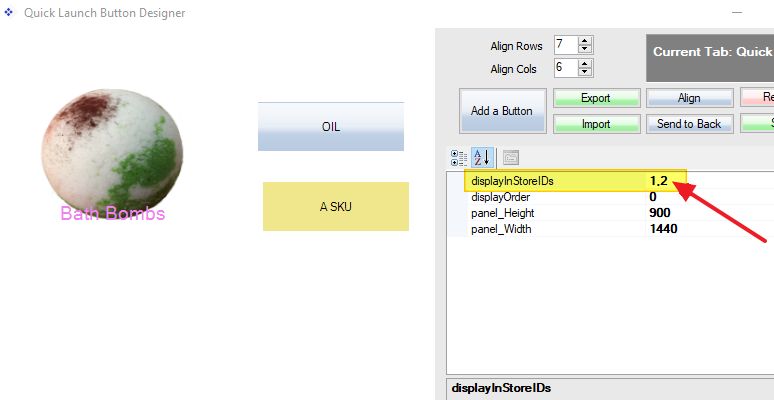
You can add a product attribute “Show In Stores”, and add stores IDs with comma-delimited.

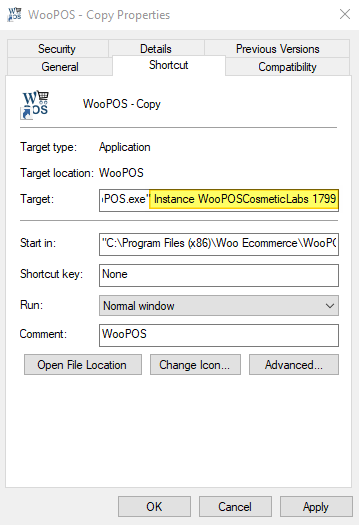
Yes. Copy the desktop WooPOS icon, and right-click to change properties.
Add this at the end of the target line:
Instance WooPOSCosmeticLabs 1799
Or
Instance WooPOS2 1799
In this case, CosmeticLabs is the business name, 1799 is the SQL TCP/IP port.
Double-click this icon on the desktop, and follow the WooPOS setup wizard to start the second business setup. Please use a different email account in the setup.
If you set up a second web store for the same business (same database), copy the c:\woopos folder to a new folder with the same name as the instance name. Then create the desktop icon, use 1788 as the SQL TCP/IP port.
Use selective snapshot, if you want to set quantities to zero for the items are in the selection but not in the list of files.
Use spot snapshot, if you want to leave quantities unchanged for the items are not in the list of files.
I believe you should use spot snapshot.
Sorry I still don’t understand your question. Hope this is will help.
When a product is out of stock, POS will give an out-of-stock warning message when selling. You can still sell the product. In most case, if the customer has the item physical on hand, the quantity number in POS system is probably wrong. The quantity should be manually adjusted or though inventory count. If you have layaway or web orders, the system will put item on-hold (A column other than QtyOnhand), and you should put the item physically aside(on hold).
I’m not sure about your questions. We use our hosted cloud database as a bridge to synchronize data between physical stores.
The branding should not be uploaded to the web by default. Please email to support with some screenshots if you need more details.
Just add GIF file (create your own) instead of JPG file in Setup->Stores->Messages->Advertising.
It’s on “Web Info” screen. You can also restart POS to refresh. Please print screenshots or record a video email to us if you have more questions.

The SAP Crystal reports won’t show properly if you use a 3-inch receipt printer as a default printer.
Please select a non-receipt printer (Laser or PDF printer) as the default printer in the Windows Control Panel.
https://www.tomshardware.com/reviews/set-default-printer-windows-10,6186.html
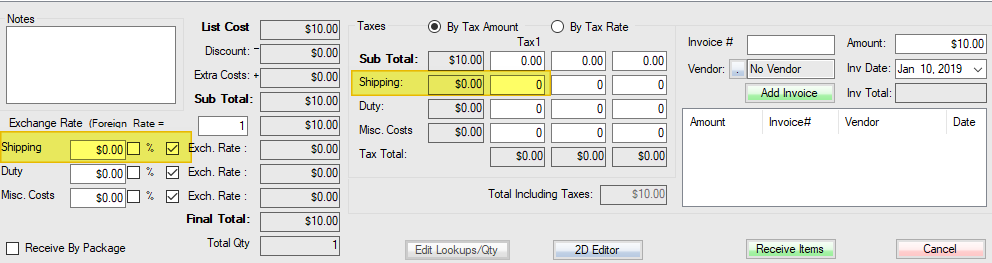
Shipping fee and miscellaneous cost can normally be added when you receive the PO. You can also add a Shipping SKU to the (bottom of) PO if you want to show it to Vendor.