
Forum Replies Created
-
If you sell both 6-unit box and individual product, you can set up the parent SKU.
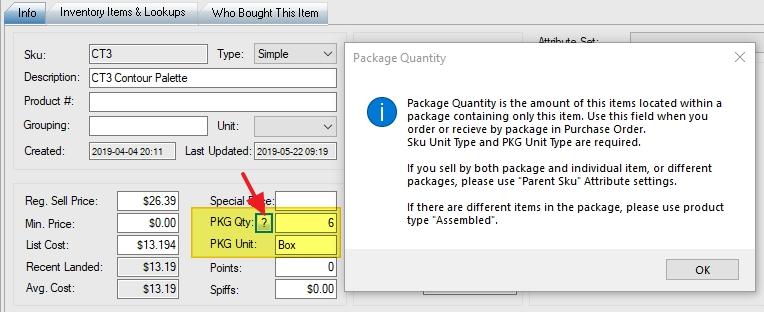
If you sell the individual product only, you don’t need to set up parent SKU. Just set up package quantity and package unit name:
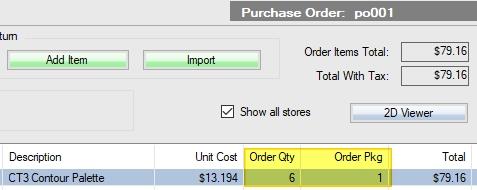
When you make a purchase order, check on the “Pkg” (package) checkbox.

You can set up auto order by individual SKU. It’ll show package quantity on the purchase order screen and report.
It will deduct from quantity on hand and put it to on-hold, until you finalize the web orders. You can select all web orders and click the finalize button one to finalize all web orders. The quantities will be changed from on-hold to sold.
Please make sure to check on “Show All Stores” (above the refresh button) on “Who Bought This Item” tab.
Please send us screenshot with examples if anything wrong.
WooPOS is a Windows Desktop app. You need to download and install it on a PC (Windows 10).
After installation, just follow this instruction to set up the WooCommerce API:
WooPOS is a Windows Desktop app. You need to download and install it on a PC (Windows 10).
After installation, just follow this instruction to setup the WooCommerce API:
You can print a consignment report and manually process sold items. You can sell a negative quantity back to the consignor and use store credit as the payment type. To automate the process, we’ll have to some custom works for you. Please Email us if you need anything.
No. We don’t store this info in POS database. I’m not sure if any WooCommerce plugins will do this. You can also try to access the WooCommerce MySQL database directly if you know how it works.
This won’t work. To make it work, the POS software has to be certified by your processor in your country. Even the same hardware model, the firmware and encryption key will be different from each processor company.
I don’t think WooPOS will handle this. Looks like you need some custom works. If you don’t share product description, pricing, stock inventory, etc, you should have everything (website/sub-domain and POS) separated.
WooPOS works on Windows only. We plan to develop a web browser version, but it will take a long time.
We don’t support multi-currency either. WooPOS can accept multi-currency payment but not for multi-currency price listing.
WooPOS doesn’t use the payment gateway you setup in WooCommerce. The online gateway is used for “card not present” transaction, while POS is for “card present” (face to face) transaction. We don’t support Stripe. For EMV(chip), non-EMV(swipe), “card not present”(phone order) transaction, you can use World Pay. You can get a quote from them.
Setting up WorldPay(Vantiv) TriPOS Cloud Payment Integration
http://info.vantiv.com/woopos (World Pay contact form)
We highly recommend World Pay as it’s more secure to process EMV with pin. You don’t need to worry about PCI Compliance:
To process integrated payment, you must have internet access. There’s no direct connection cable needed between the computer and the pin pad. World Pay provides two types of pin pad: Verifone MX915 (wired RJ45) and Ingenico iSMP4 (WiFi).
“Qty Counted” column on this screen:
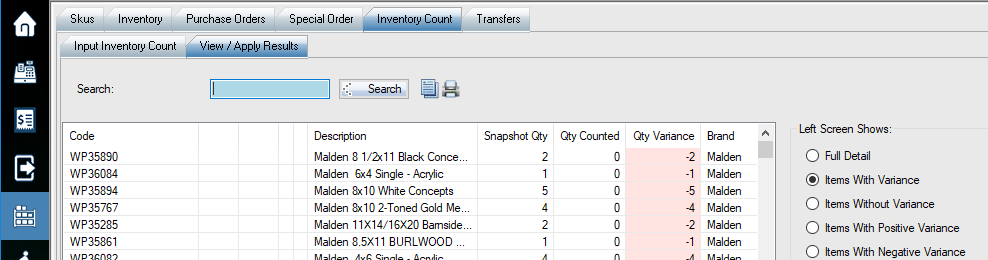
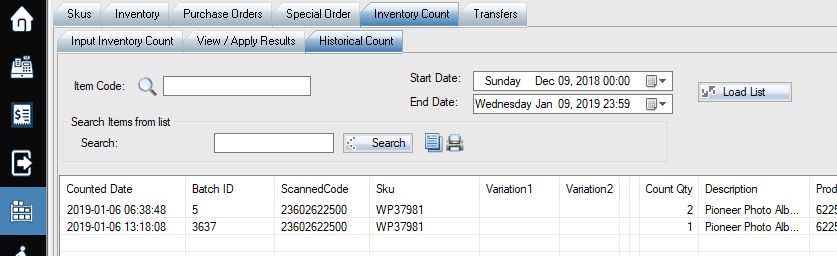
You can also view historical count here: (leave code/sku blank and click “load list” button)
Import (Import SKUsàImport Images and Attributes) your excel file and update this attribute to TRUE.
Use “Delete SKU” (Enable Switch 103 in store settings) function, built query/filter first (ToDelete=TRUE). Then select all filtered SKUs to delete.
Our price is US$25 per employee per month. To save money, you can share user id and password. But this is not recommended, as you don’t know who’s actually logged in and made mistake.
Here’re some topics on our knowledge base: