
Forum Replies Created
-
You won’t be charged for this account. You can use this account to create users, manage sensitive data. You can create another less permission user for yourself without using strong admin password for daily work.
A user is an employee login account. If a user account has login activities in the calendar month, the user is a billable user (working employees) for the month.
If you have a stable local network in the shop, you can install just one database on the main computer which is always on.
You can install a database on each computer for redundancy. The drawback is the changes in one database will be visible in another database 5 minutes later.
For the home computer, you should install the database, since it’s on a different local network.
Are you talking about inventory transfer between in-store locations? You will need the From location for transfer, but not for inventory adjustment. Please send us some screenshots by email.
If no database installed on your home computer, WooPOS will automatically connect to the cloud database. Or you can manually connect to the office computer database if you know how to set up TCP/IP port (1788) forwarding on the router.
If you install the database on your home computer (recommended), it will take about 30 minutes to download the first time. After initializing, the data should be synchronized across databases within 5 minutes if there’re no big changes like products importing.
There’s a “publish selected products from POS to web” button in Setup->WooCommerce. You can select products by building a query/filter.
When you do day end, the system will ask you if you want to delete all parked transactions. But the layaway transactions will never be deleted. You can void or recall instead.
You can do this way. But we recommend you create products in POS only. Just don’t publish the products in POS to WooCommerce.
We have the dark theme and light theme for whole POS screen, but not for button styles. You can hide some buttons in POS by permissions. You can go Setup->Positions->Permissions->Point of Sale->Visible buttons. See bottom of this page:
Please send us a list you want to delete. We’ll add the feature later.
You should do the physical count in WooPOS. Manual stock changes (except web orders) on WooCommerce won’t be synchronized to POS.
You can create a labor or service Sku here:
Product Type: Simple
ManageStock: No
Description: (leave blank if dynamically input on the fly)
Price: (leave zero if dynamically input on the fly)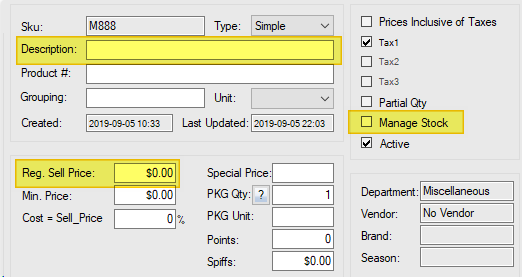
This is a security feature required by PCI compliance. If you turn it off by setting up the re-login timer:
You can also turn on switch 072 to disable strong password if it’s too annoying: